Sunday, August 5, 2012

[ROM] All ROMs for HTC Wildfire (newest version) listed by release date

Arrow [ROM] All ROMs for Wildfire (newest version) listed by release date.

Note: This page will not be upgraded from me any longer (from 20110330). I moved to HTC Desire HD (Ace) and my glorious HTC Buzz Wildfire is passed to other hands. Anyone interested in following the maintaining of this list is welcome - just open this page in "source mode" on your browser, copy the html code and start another thread.
I want to say a BIG thank you to all passionate Developers - the Buzz is indeed a pretty good piece of hardware with great potential and deserve any attention.


This is a list of lasts ROM releases and other infos for the Wildfire.

ROMs Listed by Experimental/AOSP/Sense/Hybrid and release date:

Experimental:
2011-02-28 - Honeyfire Alpha 2 (Honeycomb) by ben1066 - Thread here.

AOSP - no Sense:
2011-03-28 - CyanogenMod-7 for HTC Wildfire (Buzz) :: V7.0.0-RC3 (28/03/2011) (2.3.3 - AOSP - no Sense) by HCDR.Jacob - Thread here.
2011-03-02 - ImPrOS-Hybrid-Stable and fast-Tweaked framework (2.2.1 - AOSP - no Sense) by h4xoer - Thread here.
2011-01-23 - CyanogenMod-7 Nightly Builds for vendor Buzz. (2.3.x - AOSP - no Sense) by HCDR.Jacob - Thread here.
2010-12-15 - HCDR.Gingerfire v0.2a || Still won't work much. (2.3 - AOSP - no Sense) by HCDR.Jacob - Thread here.
2010-12-12 - CyanogenMod 6.1.0 (Stable) for HTC Buzz (Wildfire) || Nightlies now up (2.2.1 - AOSP - no Sense) by HCDR.Jacob - Thread here.
2010-12-06 - UtmostROM_2.0.8a (2.2.1 - AOSP - no Sense) by UtmostMick0 - Thread here.
2010-10-31 - OpenFire v 2.3 Froyo 2.2.1 - Facebook sync fix! (2.2.1 - AOSP - no Sense) by adeadrat - Thread here.

Sense:
2011-03-23 - Android Freedom Wildfire 2.2.1 Arabic sense (2.2.1 - Sense) by moni69 - Thread here.
2011-03-19 - *JOKERsDROID* (2.2.1 - Sense) by emiliano7 - Thread here.
2011-03-11 - DK Custom Froyo V4.3.6 (Froyo 2.2.1) Stable & Smooth (2.2.1 - Sense) by Deep-Knight - Thread here.
2011-03-10 - InsertCoin Beta v0.1 A2SD (2.2.1 - Sense) by baadnewz - Thread here.
2011-03-05 - WildPuzzleROM, android 2.3.2 with NEW SENSE (for devs, may not even work!) (2.3.2 - Sense) by danne_jo - Thread here.
2011-02-06 - [Ds_Version_7.a][opengl 1.1][transparant notifcation][custom lockscreen] (2.2.1 - Sense) by daddyspud - Thread here.
2011-01-23 - Leaf r3 [Froyo][Based on 2.34.75.1][Modded/Super Fast/Live Wallpapers] (2.2.1 - Sense) by doomed151 - Thread here.
2011-01-15 - WildPuzzleROM_2.2.1 v0.8, New Base, Transparent Lockscreen, LWP in SENSE (2.2.1 - Sense) by danne_jo - Thread here.
2011-01-13 - AeroFire_v0.1b[Froyo 2.2.1] (2.2.1 - Sense) by JoeyDelp - Thread here.
2011-01-07 - SUnAaBh v1.1| FROYO|Insane Stable|Fast|New Radio|7/1/11-LWP select added (2.2.1 - Sense) by warriorvibhu - Thread here.
2010-12-10 - 2.22.405.1 r1 - MoDaCo Custom ROM (Froyo 2.2.1) with Online Kitchen (2.2.1 - Sense) by paulobrien - Thread here.
2010-11-10 - EfferusIgnis_1.0_(Eclair)_Three_uk_ROM (2.1 - Sense) by adamsy - Thread here.
2010-11-03 - WildPuzzleROM_2.1 Eclair v1.0.1 (2.1 - Sense) by danne_jo - Thread here.
2010-10-25 - WildPuzzleROM_2.2 Froyo v8.0.11 (2.2 - Sense) by danne_jo - Thread here.
2010-09-19 - VIBES v1.6|Rooted|App2SD|Wifi-Tether|RAM Optimized|Fast|Updatable by warriorvibhu - Thread here.

Hybrid:
2011-02-22 - Stock Froyo + HTC Hybrid V6 Project On Hold (2.2.1D - Hybrid) by HewGBalls - Thread here.

Note: Essentials Differences between ROMs - by adeadrat (updated 2010-12-25 by adeadrat - thnx)

Kernel(s):
[KERNEL][OC/UV][BFQ][AUFS][FTW][GPL] HCDR.Kernel v4.1 || Flash to any ROM by HCDR.Jacob

RUU(s):
2011-01-09 - RUU_Buzz_Froyo_Orange_ES_2.34.75.1_Radio_13.55.55. 24H_3.35.20.10 SAFE! (Stock - 2.2.1 - Sense) by danne_jo
2010-12-18 - Safe Buzz_Froyo_HTC_WWE_2.22.405.1 | No Hboot | No Radio | No Rooted & Rooted (Stock - 2.2.1 - Sense) by McSpee
2010-11-28 - Repack of the chinese RUU, Android 2.2 Froyo Rooted Chinese apps removed (Stock - 2.2 - Sense) by Andrey765 - Thread here.

Useful links and Rooting:
[WARNING] Do not upgrade to the official 2.2, read the explanation, why.
Unrevoked 3 for Wildfire is now available
[GUIDE] One Click How to Root the Wildfire with Unrevoked 3.21
[AlphaRev] = FULL ROOT, AlphaRev soon to WILDFIRE (Proved working!)
[GUIDE] Turkeys' Ultimate Guide to Root Wildfire v42.1.2 (Root ROM A2SD & Unoot!)

Hoping useful, comments appreciated.

HTC Wildfire/OFFICIAL ROMs

Install Sense 3.5 on HTC Wildfire S using ‘JxMatteo’ Custom ROM

Install Sense 3.5 on HTC Wildfire S using ‘JxMatteo’ Custom ROM 


The HTC Wildfire S is still alive and kicking with this new HTC Sense 3.5 update called JxMatteo, thanks to matt5eo of XDA Developers Forum. This new update comes with new features like the following:
  • HTC Sense 3.5
  • Browser
  • SystemUI
  • Settings
  • Gallery
  • Calculator
  • Calendar
  • Clock
  • FM Radio
  • HTC Hub
  • Messages
just follow the simple steps below in updating your phone.
Note:
Requirements:
  • HTC Wildfire (CWM recovery installed)
  • USB Data Cable
  • Computer
  1. First, Download the rom file and overcloak kernel on your computer.
  2. Then, connect your phone to the computer using your USB Data Cable.
  3. Next, copy the Rom and Kernel zip files to the root directory of your SD card.
  4. Disconnect your phone to the computer.
  5. Turn it off.
  6. Go to recovery mode: press and hold the Volume down and the Power button. From the resulting HBOOT menu, press Volume down to select the Recovery option and press the Power button to activate it.
  7. Once your in Clockworkmod recovery main menu, do a nandroid backup by selecting backup> backup and restore> then backup to start saving your old ROM.
  8. Go back to main menu and perform a Full wipe by wiping the following:
    • wipe data> factory reset.
    • wipe cache partition.
    • advance> wipe dalvik cache.
  9. Go back to main menu and select install zip from SD card> then select the ROM zip fileyou downloaded earlier to start updating your phone.
    • (optional) if you want to overclock your phone select install zip from SD card> then select the overclock kernel zip file you downloaded earlier.
  10. Finally, go back to main menu again and select reboot system now.
Congratulations you have successfully updated your HTC Wildfire ROM to HTC Sense 3.5 ROM, Cheers.

sport car challenger 3D QVGA,HVGA


SCREENSHOT


DOWNLOAD: APK
DOWNLOAD: DATA

Thursday, August 2, 2012

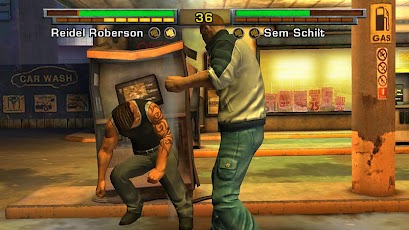
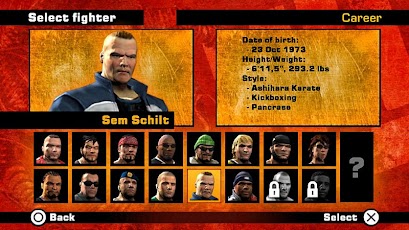
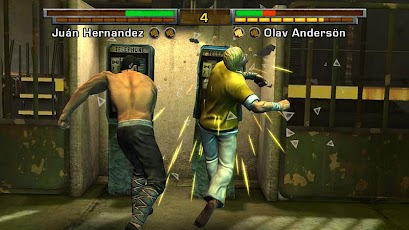
Fight Game: Heroes HD Game For HVGA(320x480) and QVGA (240x320) All Android Devices


Fight Game: Heroes HD Game For HVGA(320x480) and QVGA (240x320) All Android Devices

Nice HD fighting game Fight Game Heroes,this game is optimized for xperia play only but you can also play this game with virtual gamepad,Fight Game: Heroes 

Compete in unique environments, consisting of back alleys, grimy bars and other areas where the laws of the fight clubs reign supreme.

Fight your way to glory by defeating the Combat Sport Champions of past and present in the career-mode or try to beat your friends and foes in competitive game-modes!

KeyMapping , Gamekeyboard Settings 

Android Requirements: 2.3

Mediafire Apk(HVGA)(QVGA): Link

Gamekeyboard: GamePAD Apk Link

Install Apk and enjoy

Instructions for Gamepad:
1)install Gamekeyboard apk
2)open it and select gamekeyboard
3)follow all the steps ,do not worry this app will guide you,
4)Now Go to Gamekeyboard settings and select button mappings
5)D-Pad settings will be default,do not edit them
6)now setting your gamekeyboard like i did,select button and D-Pad Center will be X button
7)like wise more buttons will be in line GamePadA to GamePadZ ,configure it yourself,it is easy
8)now open the game,hold down home buttons and from recent apps select Gamekeyboard,then select 5th option [Tap here to call out keyboard after exit]
9)now gameleybord will appear on your game and you could play the game now
10)Enjoy The Game


Resident Evil 4 (BioHazard4) Game For Armv6 HVGA(320x480) and QVGA (240x320) All Android Devices


Resident Evil 4 (BioHazard4) Game For Armv6 HVGA(320x480) and QVGA (240x320) All Android Devices


Finally Resident Evil 4 is arrived on android phones,and working on HVGA Devices too,Game is much the same like pc version , game is in Korean language because of Korean developers have develop this game....
This a great news for every Resident Evil fans, the famous survival horror game franchise is now available on Android platform.

Game is tested On Galaxy Ace and LG Optimus One
before installing the game make sure you have at-least 100 mb free space in your internal memory.if you do not understand about how to start new game or select levels then watch the gameplay video....

Requirements:Android 2.1+

Direct Apk (HVGA,QVGA,WQVGA,WVGA): Link

Install apk and Play

Instruction to move Game in SDCard Forcefully(Root Needed)
Open Titanium backup and select Restore/backup,now find Resident evil4 and hold your finger on it ,then release your finger and you will get options,select move to sdcard and wait a while,game will be moved to sdcard....................Enjoy And Comment if works